Sunday, March 4, 2012

Web Site Migration Guide - Tips For SEOs

Posted by Modesto Siotos

Site migrations occur now and again for a various reasons but arguably are one of those areas many SEOs and site owners alike do not feel very comfortable with. Typically, site owners want to know in advance what the impact would be, often asking for information like potential traffic loss, or even revenue loss. On the other hand, SEOs need to make sure they follow best practice and avoid common pitfalls in order to make sure traffic loss will be kept to a minimum.

Disclaimer: The suggested site migration process isn't exhaustive and certainly there are several alternative or complimentary activities, depending on the size of the web site as well as the nature of the undertaken migration. I hope that despite its length, the post will be useful to SEOs and web masters alike.

Phase 1: Establishing Objectives, Effort & Process

This is where the whole migration plan will be established taking into account the main objectives, time constrains, effort, and available resources. This phase is fundamental because if essential business objectives or required resources fail to get appropriately defined, problems may arise in the following phases. Therefore, a considerable amount of time and effort needs to be allocated in this stage.

1.1 Agree on the objectives

This is necessary because it will allow for success to be measured at a later stage on the agreed objectives. Typical objectives include:

  • Minimum traffic loss
  • Minimum ranking drops
  • Key rankings maintenance
  • Head traffic maintenance
  • All the above

1.2 Estimate time and effort

It is really important to have enough time in your hands, otherwise you may have to work day and night to recover those great rankings that have plummeted. Therefore, it is important to make sure that the site owners understand the challenges and the risks. Once they understand that they, it is more likely they will happily allocate the necessary time for a thorough migration.

1.3 Be honest (...and confident)

Every site migration is different. Hence previous success does not guarantee that the forthcoming migration will also be successful. It is important to make your client aware that search engines do not provide any detailed or step-by-step documentation on this topic, as otherwise they would expose their algorithms. Therefore, best practice is followed based on own and other people’s experiences. Being confident is important because clients tend to respect more an expert's authoritative opinion. This is also important because it can impact on how much the client will trust and follow the SEO's suggestions and recommendations. Be careful not to overdo it though, because if things later go wrong there will be no excuses.

1.4 Devise a thorough migration process

Although there are some general guidelines, the cornerstone is to devise a flawless process. That needs to take into consideration:

  • Legacy site architecture
  • New Site architecture
  • Technical limitations of both platforms

1.5 Communicate the migration plan

Once the migration process has been established it needs to be communicated to the site owner as well as to those that will implement the recommendations, usually a web development team. Each part needs to understand what they are expected to do as there is no space for mistakes, and misunderstandings could be catastrophic.

Most development agencies tend to underestimate site migrations simpl because they focus almost exclusively on getting the new site up and running. Often, they do not allocate the necessary resources required to implement and test the URL redirects from the old to the new site. It is the SEO’s responsibility to make them realise the amount of work involved, as well as strongly request the new site to move first on a test server (staging environment) so implementation can be tested in advance. No matter how well you may have planned the migration steps, some extra allocated time would always be useful as things do not always go as planned.

In order for a website migration to be successful, all involved parts need to collaborate in a timely manner merely because certain actions need to be taken at certain times. If things do not seem to go the desired way, just explain the risks ranging from ranking drops to potential revenue loss. This is certainly something no site owner wants to hear about, therefore play it as your last card and things are very likely to turn around.

1.6 Find the ideal time

No matter how proactive and organised you are, things can always go wrong. Therefore, the migration shouldn't take place during busy times for the business or when time or resources are too tight. If you're migrating a retail site, you shouldn't be taking any risks a couple of months before Christmas. Wait until January when things get really quiet. If the site falls into the travel sector, you should avoid the spring and summer months as this is when most traffic and revenue is being generated. All that needs to be communicated to the client so they make an ideal business decision. A rushed migration is not a good idea, thus if there isn't enough time to fit everything in, better (try to) postpone it for a later time.

Phase 2: Actions On The Legacy Site

There are several types of site migrations depending on what exactly changes, which usually falls under one or more of the following elements:

  • Hosting / IP Address
  • Domain name
  • URL structure
  • Site Architecture
  • Content
  • Design

The most challenging site migrations involve changes in most (or all) the above elements. However, for the purposes of this post we will only look at one of the most common and complicated cases, where a web site has undergone a radical redesign resulting in URL, site architecture and content changes. In case the hosting environment is going to change the new hosting location needs to be checked for potential issues. Whoishostingthis and Spy On Web can provide some really useful information. Attention needs to be paid also on the geographic location of the host. If that is going to change, you may need to assess the advantages/disadvantages and decide whether there is a real need for that. Moving a .co.uk web site from a UK-based server to a US one wouldn't make much sense from a performance point of view.

In case the domain name is changing you may need to consider:

  • Does the previous/new domain contain more/less keywords?
  • Are both domains on the same ccTLD? Would changing that affect rankings?

2.1: Crawl the legacy site

Using a crawler application (e.g. Xenu Link Sleuth, Screaming Frog, Integrity for Mac) crawl the legacy site making sure that redirects are being identified and reported. This is important in order to avoid redirect chains later. My favourite crawling app is Xenu Link Sleuth because it is very simple to set up and does a seamless job. All crawled URLs need to be exported because they will be processed in Excel later. The following Xenu configuration is recommended because:

  • The number of parallel threads is very low to avoid time outs
  • The high maximum depth value allows for a deep crawl of the site
  • Existing redirections will be captured and reported

Custom settings for site crawling with Xenu Link Sleuth

2.2 Export top pages

Exporting all URLs that have received inbound links is more than vital. This is where the largest part of the site’s link juice is to be found, or in other words, the site’s ability to rank well in the SERPs. What you do with the link juice is another question, but you certainly need to keep it into one place (file).

Open site explorer

Open Site Explorer offers a great deal of information about a site’s top pages such as:

  • Page Authority (PA)
  • Linking Root Domains
  • Social Signals (Facebook likes, Tweets etc.)

In the following screenshot, a few, powerful 404 pages have been detected which ideally should be 301 redirected to a relevant page on the site.

Majestic SEO

Because Open Site Explorer may haven’t crawled/discovered some recent pages, it is always worth carrying out the same exercise using Majestic SEO, either on the whole domain or the www subdomain, depending on what exactly is being migrated. Pay attention to ACRank values, pages with higher ACRank values are the most juiciest ones. Downloading a CSV file with all that data is strongly recommended.

Webmaster tools

In case you don’t have a subscription to Open Site Explorer or Majestic SEO you could use Google’s Web Master Tools. Under Your Site on the Web -> Links to your site you will find Your Most Linked Content. Click on 'More' and Download the whole table into a CSV file. In terms of volume, WMT data aren’t anywhere near OSE or Majestic SEO but it is better than nothing. There are several other paid or free backlinks information services that could be used to add more depth into this activity.

Google analytics

Exporting all URLs that received at least one visit over the last 12 months through Google Analytics is an alternative way to pick up a big set of valuable indexed pages. If not 100% sure about how to do that, read this post Rand wrote a while ago.

Indexed pages in Google

Scrapping the top 500 or top 1000 indexed pages in Google for the legacy site may seem like an odd task but it does have its benefits. Using Scrapebox or the scraper extension for Chrome perform a Google search for site:www.yoursite.com and scrape the top indexed URLs. This step may seem odd but it can identify:

  • 404 pages that are still indexed by Google
  • URLs that weren’t harvested in the previous steps

Again, save all these URLs in another spreadsheet.

2.3 Export 404 pages

Site migrations are great opportunities to tide things up and do some good housekeeping work. Especially with big sites, there is enormous potential to put things in order again; otherwise hundreds or even thousands of 404 pages will be reported again once the new site goes live. Some of those 404 pages may have quality links pointing to them.

These can be exported directly from Webmaster Tools under Diagnostics->Crawl Errors. Simply download the entire table as a CSV file. OSE also reports 404 pages, so exporting them may also be worthwhile. Using the SEO Moz Free API with Excel, we can figure out which of those 404 pages are worth redirecting based on metrics such as high PA, DA, mozRank and number of external links/root domains. Figuring out where to redirect each of these 404 pages can be tricky, as ideally each URL should be redirected to the most relevant page. Sometimes, this is can be "guessed" by looking for keywords in the URL. In cases that it is not possible, it is worth sending an email to the development team or the web master of the site, as they may be able to assist further.

2.4 Measure site performance

This step is necessary when there is an environment or platform change. It is often the case, that a new CMS although does a great job in terms of managing the site’s content, it does affect site performance in a negative way. Therefore, it is crucial to make some measurements before the legacy site gets switched off. If site performance deteriorates, crawling may get affected which could then affect indexation. With some evidence in place, it will be much easier building up a case later, if necessary. Although there are several tools, Pingdom seems to be a reliable one.

The most interesting stuff appears on the summary info box as well as on the Page Analysis Tab. Exporting the data, or even just getting a screenshot of the page could be valuable later. It would be worth running a performance test on some of the most typical pages e.g. a category page, a product page as well as the homepage.

Pingdom Tools Summary

Keep a record of typical loading times as well as the page size. If loading times increase whilst the size of the page remains is the same, something must have gone wrong.

Pingdom Page Analysis Tab

Running a Web Page Test would also be wise so site performance data are cross-referenced across two services just to make sure the results are consistent.

The same exercises should be repeated once the new site is on the test server as well as when it finally goes live. Any serious performance issues need to be reported back to the client so they get resolved.

2.5 Measure rankings

This step should ideally take place just before the new site goes live. Saving a detailed rankings report, which contains as many keywords as possible, is very important so it can be used as a benchmark for later comparisons. Apart from current positions it would be wise to keep a record of the ranking URLs too. Measuring rankings can be tricky though, and a reliable method needs to be followed. Chrome's Google Global extension and SEO SERP are two handy extensions for checking a few core keywords. With the former, you can see how rankings appear in different countries and cities, whilst the latter is quicker and does keep historical records. For a large number of keywords, proprietary or paid automated services should be used in order to save time. Some of the most popular commercial rank checkers include Advanced Web Ranking, Web CEO and SEO Powersuite to name a few.

With Google Global extension for Chrome you can monitor how results appear in different countries, regions and cities.

Phase 3: URL Redirect Mapping

During this phase, pages (URLs) of the legacy site need to be mapped to pages (URLs) on the new site. For those pages where the URL remains the same there is nothing to worry about, provided that the amount of content on the new page hasn’t been significantly changed or reduced. This activity requires a great deal of attention, otherwise things can go terribly wrong. Depending on the size of the site, the URL mapping process can be done manually, which can be very time consuming, or automation can often be introduced to speed things up. However, saving up on time should not affect the quality of the work.

Even though there isn't any magic recipe, the main principle is that ALL unique, useful or authoritative pages (URLs) of the legacy site should redirect to pages with the same or very relevant content on the new site, using 301 redirects. Always make sure that redirects are implemented using 301 redirects (permanent ) that pass most link equity from the old to the new page (site). The use of 302 (temporary) redirects IS NOT recommended because search engines treat them inconsistently and in most cases do not pass link equity, often resulting in drastic ranking drops.

It’s worth stressing that pages with high traffic need extra attention but the bottom line is that every URL matters. By redirecting only a percentage of the URLs of the legacy site you may jeopardise the new domain’s authority as a whole, because it may appear to search engines as a weaker domain in terms of link equity.

URL Mapping Process (Step-by-step)

  1. Drop all legacy URLs, which were identified and saved in the CSV files earlier (during phase 2), into a new spreadsheet (let's call it SpreadSheet1).
  2. Remove all duplicate URLs using Excel.
  3. Populate the page titles using the SEO for excel tool.
  4. Using SEO for Excel, check the server response headers. All 404 pages should be kept into a different tab so all remaining URLs are those with a 200 server response.
  5. In a new Excel spreadsheet (let's call it SpreadSheet2) drop all URLs of the new site (using a crawler application).
  6. Pull in the page titles for all these URLs as in step 3.
  7. Using the VLOOKUP Excel function, match URLs between the two spreadsheets
  8. Matched URLs (if any) should be removed from SpreadSheet1 as they already exist on the new site and do not need to be redirected.
  9. The 404 pages which were moved into a separate worksheet in step 4, need to be evaluated for potential link juice. There are several ways to make this assessment but the most reliable ones are:
    • SEO Moz API (e.g. using the handy Excel extension SEO Moz Free API)
    • Majestic SEO API
  10. Depending on how many “juicy” URLs were identified in the previous step, a reasonable part of them needs to be added into Spreadsheet1.
  11. Ideally, all remaining URLs in SpreadSheet1 need to be 301 redirected. A new column (e.g. Destination URLs) needs to be added in SpreadSheet 1 and populated with URLs from the new site. Depending on the number of URLs to be mapped this can be done:
    • Manually – By looking at the content of the old URL, the equivalent page on the new site needs to be found so the URL gets added in the Destination URLs column.
      1. If no identical page can be found, just chose the most relevant one (e.g. similar product page, parent page etc.)
      2. If the page has no content pay attention to its page title (if known or still cached by Google) or/and URL for keywords which should give you a clue about its previous content. Then, try to find a relevant page on the new site; that would be the mapping URL.
      3. If there is no content, no keywords in the URL and no descriptive page title, try to find out from the site owners what those URLs used to be about.
    • Automatically - By writing a script that maps URLs based on page titles, meta description or URL patterns matching.
  12. Search for duplicate entries again in the ‘old URLs’ row and remove the entire row.
  13. Where patterns can be identified, pattern matching rules using regular expressions are always more preferable because that would reduce the web server's load. Ending up with thousands one-to-one redirects is not ideal and should be avoided, especially if there is a better solution.

Phase 4: New Site On Test Server

Because human errors do occur, testing that everything has gone as planned is extremely important. Unfortunately, because the migration responsibility falls mainly on the shoulders of the SEO, several checks need to be carried out.

4.1 Block crawler access

The first and foremost thing to do is to make sure that the test environment is not accessible to any search engine crawler. There are several ways to achieve that but some are better than others.

  • Block access in robots.txt (not recommended)

This is not recommended because Google would still crawl the site and possibly index the URLs (but not the content). This implementation also runs the risk of going live if all files on the test server are going to be mirrored on the live one. The following two lines of code will restrict search engines access to the website:

User-Agent: *
Disallow: /

  • Add a meta robots noindex to all pages (not recommended)

This is recommended by Google as a way to entirely prevent a page's contents from being indexed.

<html>
<head>
<title>...</title>
<meta name="robots" content="noindex">
</head>

The main reason this is not recommended is because it runs the risk to be pushed to the live environment and remove all pages out of the search engines' index. Unfortunately, web developers' focus is on other things when a new site goes live and by the time you notice such a mistake, it may be a bit late. In many cases, removing the noindex after the site has gone live can take several days, or even weeks depending on how quickly technical issues are being resolved within an organisation. Usually, the bigger the business, the longer it takes as several people would be involved.
  • Password-protect the test environment (recommended)

This is a very efficient solution but it may cause some issues. Trying to crawl a password protected website is a challenge and not many crawler applications have the ability to achieve this. Xenu Links Sleuth can crawl password-protected sites.

  • Allow access to certain IP addresses (recommended)

This way, the web server allows access to specific external IP addresses e.g. that of the SEO agency. Access to search engine crawlers is restricted and there are no indexation risks.

4.2 Prepare a Robots.txt file

That could be a fairly basic one, allowing access to all crawlers and indicating the path to the XML sitemap such as:

User-agent: *
Allow: /
Sitemap: http://www.yoursite.com/sitemap.xml

However, certain parts of the site could be excluded, particularly if the legacy site has duplicate content issues. For instance, internal search, pagination, or faceted navigation are often generating multiple URLs with the same content. This is a great opportunity to deal with legacy issues, so search engine crawling of the website can become more efficient. Saving up on crawl bandwidth will allow search engine to crawl only those URLs which are worthy of being indexed. That means that deep pages would stand a better chance to be found and rank quicker.

4.3 Prepare XML sitemap(s)

Using your favourite tool, generate an XML sitemap, ideally containing HTML pages only. Xenu again does a great job because it easily generate XML sitemaps containing only HTML pages. For large web sites, generating multiple XML sitemaps for the different parts of the site would be a much better option so indexation issues could be easier identified later. The XML sitemap(s) should then be tested again for broken links before the site goes live.

Source: blogstorm.co.uk

Google Webmaster Tools allow users to test XML sitemaps before they get submitted. This is something worth doing in order to identify errors.

4.4 Prepare HTML sitemap

Even though the XML sitemap alone should be enough to let search engines know about the URLs on the new site, implementing an HTML sitemap could help search engine spiders make a deep crawl of the site. The sooner the new URLs get crawled, the better. Again, check the HTML sitemap for broken links using Check My Links (Chrome) or Simple Links Counter (Firefox).

4.5 Fix broken links

Run the crawler application again as more internal/external broken links, (never trust a) 302 redirects, or other issues may get detected.

4.6 Check 301 redirects

This is the most important step of this phase and it may need to be repeated more than once. All URLs to be redirected should be checked. If you do not have direct access to the server one way to check the 301 redirects is by using Xenu's Check URL List feature. Alternatively, Screaming Frog's list view can be used in a similar manner. These applications will report whether 301s are in place or not, but not if the destination URL is the correct one. That could only be done in Excel using the VLOOKUP function.

4.7 Optimise redirects

If time allows, the list of redirects needs to be optimised for optimal performance. Because the redirects are loaded into the web server's memory when the server starts, a high number of redirects can have a negative impact on performance. Similarly, each time a page request is being made, the web server will compare that against the redirects list. Thus, the shorter the list, the quicker the web server will respond. Even though such performance issues can be compensated by increasing the web server's resources, it is always best practice to work out pattern matching rules using regular expressions, which can cover hundreds or even thousands of possible requests.

4.8 Resolve duplicate content issues

Duplicate content issues should be identified and resolved as early as possible. A few common cases of duplicate content may occur, regardless of what was happening previously on the legacy web site. URL normalisation at this stage will allow for optimal site crawling, as search engines will come across as many unique pages as possible. Such cases include:

  • Directories with and without a trailing slash (e.g. this URL should redirect to that).
  • Default directory indexes (e.g. this URL should redirect to that).
  • Case in URLs. (e.g. this URL should redirect to that, or just return the 404 error page like this as opposed to that, which is the canonical one).
  • Different protocols. The most typical example is when a website is accessible via http and https. (e.g. this URL should redirect to that). However, this type of redirect needs attention as some URLs may need to exist only on https. Added Feb 26
  • Accessible IP addresses. Being able to access a website by requesting its IP address can cause duplicate content issues. (e.g. this URL should redirect to that). Added Feb 26
  • URLs on different host domains e.g. www.examplesite.com and examplesite.com (e.g. this URL should redirect to that).
  • Internal search generating duplicate pages under different URLs.
  • URLs with added parameters after the ? character.

In all the above examples, poor URL normalisation results in duplicate pages that will have a negative impact on:

  • Crawl bandwidth (search engine crawlers will be crawling redundant pages).
  • Indexation (as search engines try to remove duplicate pages from their indexes).
  • Link equity (as it will be diluted amongst the duplicate pages).

4.9 Site & Robots.txt monitoring

Make sure the URL of the new site is monitored using a service like Uptime Robot. Each time the site is down for whatever reason, Uptime Robot will be notified by email, Twitter DM, or even SMS. Another useful service to set up a robots.txt monitoring service such as Robotto. Each time the robots.txt file gets updated you get notified, which is really handy.

Uptime Robot logs all server up/down time events

Phase 5: New Site Goes Live

Finally the new site has gone live. Depending on the authority, link equity and size of the site Google should start crawling the site fairly quickly. However, do not expect the SERPs to be updated instantly. The new pages and URLs will be updated in the SERPs over a period of time, which typically can take from two to four weeks. For pages that seem to take ages to get indexed it may be worth using a ping service like Pingler.

5.1 Notify Google via Webmaster Tools

If the domain name changes, you need to notify Google via the Webmaster Tools account of the old site, as soon as the new site goes live. In order to do that, the new domain needs to be added and verified. If the domain name remains the same, Google will find its way to the new URLs sooner or later. That mainly depends on the domain authority of the site and how frequently Google visits it. It would also be a very good idea to upload the XML sitemap via Webmaster Tools so the indexation process can be monitored (see phase 6).

5.2 Manual checks

No matter how well everything appeared on the test server, several checks need to be carried out and running the crawler application again is the first thing to do. Pay attention for:

  • Anomalies in the robots.txt file
  • Meta robots noindex tags in the <head> section of the HTML source code
  • Meta robots nofollow tags in the source code
  • 302 redirects. 301 redirects should be used instead as 302s are treated inconsistently by search engines and do not pass link equity
  • Check Webmaster Tools for errors messages
  • Check XML sitemap for errors (e.g. broken links, internal 301s)
  • Check HTML sitemap for similar errors (e.g. using Simple Links Counter or Check My Links)
  • Missing or not properly migrated page titles
  • Missing or not properly migrated meta descriptions
  • Make sure that the 404 page returns a 404 server response
  • Make sure the analytics tracking code is present on all pages and is tracking correctly
  • Measure new site performance and compare it with that of the previous site

Using Httpfox, a 302 redirect has been detected

5.3 Monitor crawl errors

Google Webmaster tools, Bing Webmaster Tools and Yandex Webmaster all report crawl errors and is certainly worth checking often during the first days or even weeks. Pay attention to reported errors and dates and always try figure out what has been caused by the new site or the legacy one.

5.4 Update most valuable inbound links

From the CSV files created in step 3.2, figure out which are the most valuable inbound links (using Majestic or OSE data) and then try to contact the web masters of those sites, requesting a URL update. Direct links pass more value than 301 redirects and this time-consuming task will eventually pay back. On the new site, check the inbound links and top pages tabs of OSE and try to identify new opportunities such as:

  1. Links from high authority sites which are being redirected.
  2. High authority 404 pages which should be redirected so the link juice flows to the site.

In the following example, followed and 301 external links have been downloaded in a CSV file.

Pay attention to the '301' columns for cells with the Yes value. Trying to update as many of these URLs as possible so the point directly to the site would pass more link equity to the site:

Identify the most authoritative links and contact website owners to update them so they point to the new URL

5.5 Build fresh links

Generating new, fresh links to the homepage, category and sub-category pages is a good idea because:

  1. With 301 redirects some link juice may get lost, thus new links can compensate for that.
  2. They can act as extra paths for search engine spiders to crawl the site.

5.6 Eliminate internal 301 redirects

Although Web masters are quite keen on implementing 301 redirects, they often do not show the same interest updating the onsite URLs so internal redirects do not occur. Depending on the volume and frequency of internal 301 redirects, some link juice may evaporate, whilst the redirects will unnecessarily add an extra load to the web server. Again, in order to detect internal 301 redirects, crawling the site would be handy.

Phase 6: Measure Impact/Success

Once the new site gas finally gone live, the impact of all the previous hard work needs to be monitored. It may be a good idea monitoring rankings and indexation on a weekly basis but in general no conclusions should be made earlier than 3-4 weeks. No matter how good or bad rankings and traffic appear to be, you need to be patient. A deep crawl can take time, depending on the site's size, architecture and internal linking. Things to be looking at:

  • Indexation. Submitted and indexed number of URLs reported by Webmaster Tools (see below)
  • Rankings. They usually fluxuate for 1-3 weeks and initially they may drop. Eventually, they should recover around the same positions they were previously (or just about).
  • Open site explorer metrics. Although they do not get updated daily, it is worth keeping an eye on reported figures for Domain Authority, Page Authority and MozRank on a monthly basis. Ideally, the figures should be as close as possible to those of the old site within a couple of months. If not, that is not a very good indication and you may have lost some link equity along the way.
  • Google cache. Check the timestamps of cached pages for different page types e.g. homepage, category pages, product pages.
  • Site performance in Webmaster Tools. This one may take a few weeks until it gets updated but it is very useful to know how Google perceives site performance before and after the migration. Any spikes that stand out need should alarm the web master and several suggestions can be made e.g. using Yslow and Page Speed in Firefox or Page Speed and Speed Tracer in Chrome.

Check site performance in Webmaster Tools for unusual post migration anomalies

Indexation of web pages, images and videos can be monitored in Google Webmaster Tools

Appendix: Site Migration & SEO Useful Tools

Some of the following tools would be very handy during the migration process, for different reasons.

Crawler applications

Xenu Link Sleuth (free)
Analog X Link Examiner (free)
Screaming Frog (paid)
Integrity (For MAC - free)

Scraper applications

Scraper Extension for Chrome
Scrapebox (paid)

Link Intelligence software

Open Site Explorer (free & paid)
Majestic SEO (free & paid)

HTTP Analysers

HTTP Fox (Firefox)
Live HTTP Headers (Firefox)

IP checkers

Show IP (Firefox)
WorldIP (Firefox)
Website IP (Chrome)

Link checkers

Simple Links Counter (Firefox)
Check My Links (Chrome)

Monitoring tools

Uptime Robot (monitors domains for downtime)
Robotto (monitors robots.txt)

Rank checkers

Google Global (Chrome)
SEO SERP (Chrome)
SEO Book Rank Checker (Firefox)

Site performance analysis

Yslow (Firefox)
Page Speed (for Firefox)
Page Speed (for Chrome)
|Speed Tracer (Chrome)

About the author

Modesto Siotos (@macmodi) works as a Senior Natural Search Analyst for iCrossing UK, where he focuses on technical SEO issues, link tactics and content strategy. His move from web development into SEO was a trip with no return, and he is grateful to have worked with some SEO legends. Modesto is happy to share his experiences with others and writes regularly for a digital marketing blog.This is his first post for SEOmoz.


Sign up for The Moz Top 10, a semimonthly mailer updating you on the top ten hottest pieces of SEO news, tips, and rad links uncovered by the Moz team. Think of it as your exclusive digest of stuff you don't have time to hunt down but want to read!

Source: http://feedproxy.google.com/~r/seomoz/~3/CMs8Q6ciGm4/web-site-migration-guide-tips-for-seos

contractors website contractors websites

Using Social Media Profiles for ORM

Whenever you are involved in an ORM (Online Reputation Management) campaign, your goal is to displace negative results in the search engines with positive results. In a previous post we looked at creating microsites. In this post, we are going to look at leveraging social media profiles. As with every search result in Google, the [...]

This post originally came from Michael Gray who is an SEO Consultant. Be sure not to miss the Thesis Wordpress Theme review.

Using Social Media Profiles for ORM

tla starter kit

Related posts:

  1. Looking at Fake Social Media Profiles Somewhere in the middle of all the drama last week...
  2. Talking Social Media With Loren Feldman of 1938 Media I had the pleasure of hanging with Loren Feldman of...
  3. How Businesses Should React to Negative Social Media & Reviews Social Media still scares many businesses both large and small....
  4. iPad Apps and Social Media In case you didn’t already know, I’m the owner of...
  5. How Long Should Page Titles Be – The Social Media Factor Ever since the early days of SEO, the ideal title...

Advertisers:

  1. Text Link Ads - New customers can get $100 in free text links.
  2. BOTW.org - Get a premier listing in the internet's oldest directory.
  3. Ezilon.com Regional Directory - Check to see if your website is listed!
  4. Need an SEO Audit for your website, look at my SEO Consulting Services
  5. Directory Journal - Get permanent deep links in a search engine friendly directory
  6. LinkWheel SEO - Get Web 2.0 Backlinks
  7. TigerTech - Great Web Hosting service at a great price.
  8. Article-Writing-services.org - Article Writing Services creates quality content for websites and blogs at no cost to site owners.
  9. Link Building Services - Hire WeBuildLink.com for well-planned advanced link building campaigns. Very affordable. Contact us now for a FREE evaluation.
  10. Join 500+ top agencies & publishers who rely on The HOTH every day. US based, enterprise-grade support. High quality, contextually relevant links. 100% money back guarantee. Try it now.
  11. Professional website designs - Get a unique brand image with website designs that sets you apart and convert your visitors into customers. Make a brand, not just a website
  12. Krystal Glass Whiteboards - Glass writing boards for offices, boardrooms, and classrooms.
  13. Performance-Based White Label SEO
  14. SEO Cockpit

Advertisers:

  1. Text Link Ads - New customers can get $100 in free text links.
  2. BOTW.org - Get a premier listing in the internet's oldest directory.
  3. Ezilon.com Regional Directory - Check to see if your website is listed!
  4. Need an SEO Audit for your website, look at my SEO Consulting Services
  5. Directory Journal - Get permanent deep links in a search engine friendly directory
  6. LinkWheel SEO - Get Web 2.0 Backlinks
  7. TigerTech - Great Web Hosting service at a great price.
  8. Article-Writing-services.org - Article Writing Services creates quality content for websites and blogs at no cost to site owners.
  9. Link Building Services - Hire WeBuildLink.com for well-planned advanced link building campaigns. Very affordable. Contact us now for a FREE evaluation.
  10. Join 500+ top agencies & publishers who rely on The HOTH every day. US based, enterprise-grade support. High quality, contextually relevant links. 100% money back guarantee. Try it now.
  11. Professional website designs - Get a unique brand image with website designs that sets you apart and convert your visitors into customers. Make a brand, not just a website
  12. Krystal Glass Whiteboards - Glass writing boards for offices, boardrooms, and classrooms.
  13. Performance-Based White Label SEO
  14. SEO Cockpit

Source: http://feedproxy.google.com/~r/Wolf-howl/~3/FuL9wjVi7KM/

contractors websites contractor advertising

Microsoft Advertising Begins Aggressively Courting Small Businesses For Search

Source: http://feeds.searchengineland.com/~r/searchengineland/~3/K28aZ3ITdBs/microsoft-advertising-begins-aggressively-courting-small-businesses-for-search-113532

websites for contractors marketing for contractors

Google Loves Brands

Sharing is caring!

Please share :)

Embed code is here.

Google Brands.

Categories: 

Source: http://www.seobook.com/brands

contractor website contractor websites

The Decline of Organic Links Infographic

Sharing is caring!

Please share :)

Embed code is here.

How Google Hit Organic Links.

For many years it was true that SEO = links, but due to the rise of rel=nofollow, fearmongering & social media, organic links have lost much of their relative importance in many verticals.

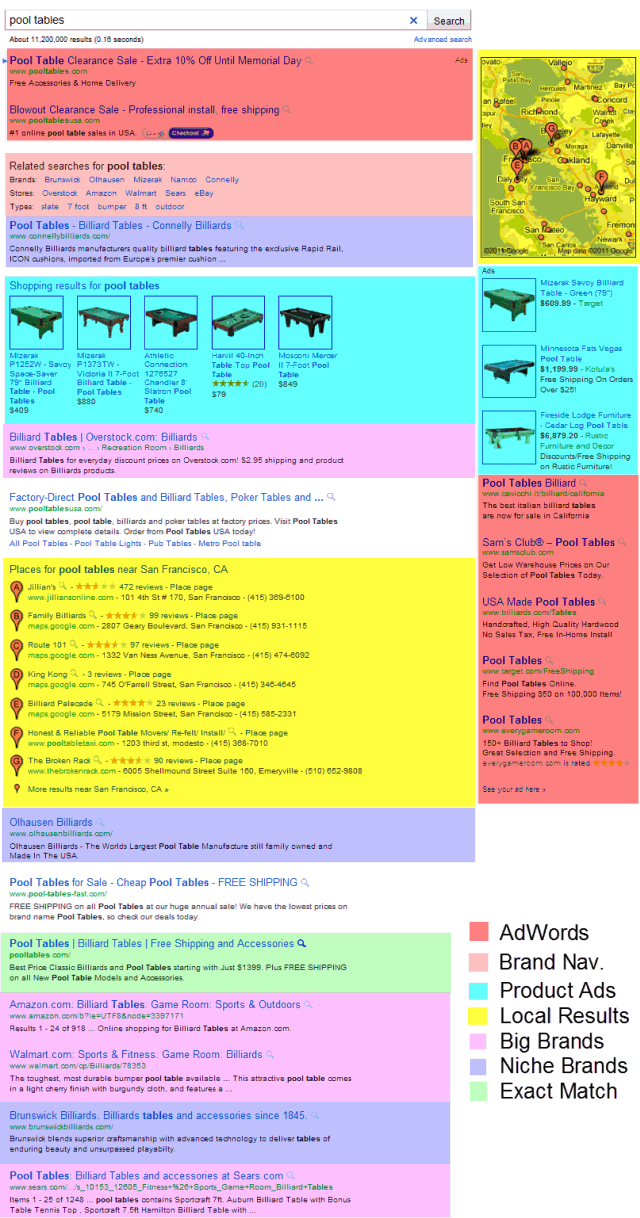
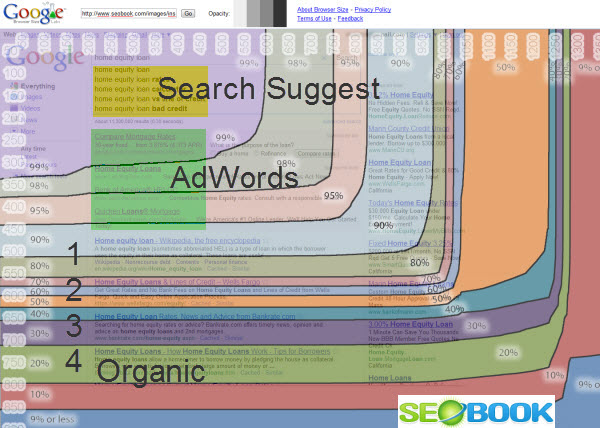
Links are still valuable in some areas of course, but where the search results are full of listings from Google.com, pushed below the fold from larger AdWords ads and/or heavily skewed by things like brand bias there is much less value in link building in numerous big money markets. After all, few care who ranks #1 if #1 is below the fold!

Categories: 

Source: http://www.seobook.com/organic-links

internet marketing for contractors contractor website

Saturday, March 3, 2012

What Susan G Komen Doesn't Understand About Communities and You Should

Posted by ericpratum

Recently, Susan G. Komen pulled some funding for Planned Parenthood, and the internet exploded in disgust. Some people responded maliciously by supposedly hacking their site:

Komen hacked

Others responded with donations:

Global neighborhoods can appear, exist, and disappear overnight.

In Shel Israel's 2009 book Twitterville, he argues that communities and causes now form around issues of the day and not organizations. Because of all of the possibilities to connect, it's no longer necessary to fly to Haiti to see the effect of your donations or advocacy. You can advocate online, see the dollars get racked up, get emailed pictures of people being helped, and then see the YouTube video about all of it tomorrow.

Leveraging pre-existing networks to fight SOPA.

Reddit SOPA BlackoutDuring the recent SOPA blackout, supporters used pre-existing communities (*cough* Reddit) to tip a movement from underground, web-entrepreneurs, and web-folk lurkers being upset to popular media movement. Their success was based by and large on leveraging communities that already existed. Their "global neighborhood," as Shel Israel might have dubbed it, appeared quickly, made use of a network that already existed.

If anti-SOPA protesters had tried to do this all themselves and build a community from scratch, they wouldn't have gotten anywhere. Without the initial mass media attention that something like an earthquake garners, getting a community moving takes months if not years.

SOPA succeeded in part because of using those pre-existing communities.

Building events from communities of passion.

Social SlamMark Schaefer was blogging away at {grow} for months and months before he and Social Media Club Knoxville dreamed up the first Social Slam, an event I am happy to have attended and will now be speaking at this year. They debated whether or not the event would be successful in little, old Knoxville or if they needed to move it to Atlanta, my town, to get a proper audience.

Because Social Slam leveraged the high-passion community that Mark had built around his blog, the event sold out in its first year and had to be moved to a larger location. People came in from every corner of the US, seriously, and this year, the speakers list includes people like Mitch Joel, Gini Dietrich, Tom Webster, and Marcus Sheridan. All for an event that costs only $90 to attend and is in Knoxville... not LA, not NYC, not Atlanta... Knoxville.

When a machete to the face moves the world.

Anthony OmariOn January 23rd, men broke into a Kenyan orphanage, and in a fight that ensued, Anthony Omari was struck in the face with a machete blade. Two days later, Reddit user TheLake posted this photo and asked if users could donate $2,000 to help.

Within 24 hours, Redditors had donated over $65,000 to build a wall, improve the orphanage, and help Omari, and as members of communities often do, TheLake returned with more pictures and words of thanks.

If TheLake had posted his request to Kickstarter or tried to build his own network, he would have been lucky to get $200, not to mention the requested $2,000. Because he leveraged an existing community, where a global neighborhood could pop up and then disappear quickly, he had access to people with the means to help, an immediate way to get his message out, and a way to respond to that community with information that helped them to feel secure in their contributions: photos, comments, etc.

Ego stroking works as long as it's not just ego stroking.

Click worthy titles

Dan's recent YouMoz post had both a great title and good analysis. If the number of comments and thumbs are any indication, he was smart in choosing to post this here rather than anywhere else.

Several factors played into Dan's success here:

  1. He posted the right topic in the right community.
  2. He stroked a few community mogul egos with his screen shots.
  3. His praise of those people wasn't empty, but rather appropriate.
  4. He didn't try to hammer it out alone, building his own network or community. He went where there was a community ready for his message.

Similar things could be said of other members of the SEOmoz community that, rather than building their own separate communities, have smartly leveraged the people and relationships here to build their businesses, events, brands, and more. This is going where the people are rather than trying to build a more attractive community and then fill it with people.

What you can learn from Susan G Komen and these examples.

Yay, Boo.Global neighborhoods can pop up anywhere, around anything. If millions of people can feel connected to Haitian earthquake victims, stand together to fight SOPA, or donate 32.5x the asked amount to an orphanage in Kenya and feel good about it, you can leverage a network or two to build your business, spread your message, and maybe even protect you from the blowback associated with breaking bad news.

SEOs often talk about places like Reddit like the community is only there to be seeded and as if previously popular, strong-PR subreddits are gold mines for link building, but while links can be votes of confidence for your site, community members can be bellmen for your causes and missions.

In this move and decision, Susan G Komen caved to pressure, did not fully explain itself to the people most concerned, and never bothered to reach out to a community to engage with or support it.

Don't reinvent the wheel.

So goodCorporate blogging has declined in the last year, and I'd wager it is due to marketers trying to remake their corporate marketing in the model of previously successful ventures only to realize what we all know offline. Copying success often does not lead to success. Instead, plugging into ready and waiting communities and providing something they desperately need and care about does.

And, it doesn't hurt to stroke egos now and then...as long as it's warranted and genuine.


Sign up for The Moz Top 10, a semimonthly mailer updating you on the top ten hottest pieces of SEO news, tips, and rad links uncovered by the Moz team. Think of it as your exclusive digest of stuff you don't have time to hunt down but want to read!

Source: http://feedproxy.google.com/~r/seomoz/~3/ogSBUpanyG4/what-susan-g-komen-doesnt-understand-about-communities-and-you-should

contractor advertising contractor web design

Brand It: Four Ways to Brand Your Business via Pinterest ? Part 3

What do Chobani Yogurt, Drake University, and Oreck Vacuums all have in common?� They are all rock stars at leveraging Pinterest to brand their business. Each plays to their unique demographic ? Chobani dedicates their pins to delectable treats, Drake boasts boards of bulldogs and study guides, and Oreck features re-pins of ... Read more

Source: http://www.seo.com/blog/brand-ways-brand-business-pinterest-part-3/

websites for contractors marketing for contractors

Cloaking: Survey Says?

In the below video Matt Cutts states that "there is no such thing as white hat cloaking" ...

... yet Google is testing a new ad unit where users have to fill out a survey before they can view the content.

How long until the surveys include something like:

  • did you vote in 2008
  • what presidential candidate did you vote for
  • how do you feel about issue x
  • how strongly do you feel about your opinion on x

Then after the survey: "Thanks for your feedback. Candidate y supports your views on issue x."

Advertisers then get a report like: "in Ohio, 84% of the 289,319 swing voters with an average household income between $32,400 and $67,250 think issue x is vitally important and have a 6:1 bias toward option A. They respond to it more strongly if you phrase it as "a c b" and are twice as likely to share your view if you phrase it that way. The bias is even stronger amongst women & voters under 50, where they prefer option A by a factor of 9:1."

Couple that ability to flagrantly violate their own editorial guidelines with...

... & Google is in an amazing position politically.

It is thus not surprising to see how politicians have a hard time being anything but pro-Google, as they are the new Western Union.

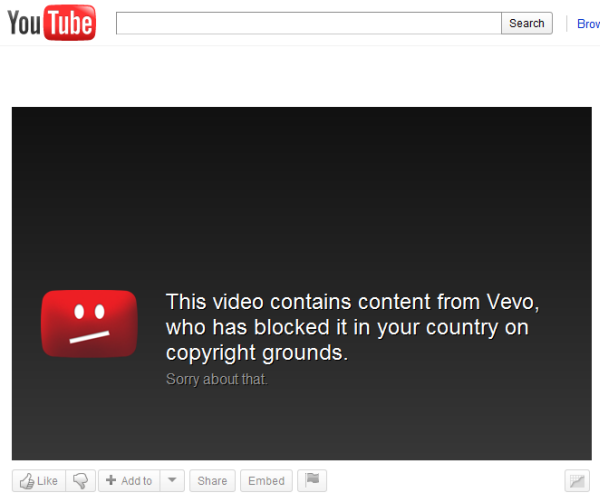
This isn't the first time Google experimented with cloaking either. Threadwatch had a post on Google cloaking their help files years ago & YouTube offers users a screw you screen if they are in a country where the content isn't licensed - yet they still show those cloaked pages ranking in the search results.

?The most perfidious way of harming a cause consists of defending it deliberately with faulty arguments.? ? Friedrich Nietzsche

It is common knowledge that you shouldn't mix business and politics, however if one looks at history, many of those who gave us those sage words did precisely the opposite - and often illegally so - selling us down the river.

What is so obnoxious about Google's survey trial is that a big site that was hit by Panda was hit because they used scroll cloaking & didn't let the users get to the content right away. Googlers suggested users didn't like it & voted against it, and then roll out the same sort of "wait 1 moment please" stuff themselves as a custom beta ad unit.

And today Google just announced that they might create an algorithm which looks at ad placements on a website as a spam signal outside of Panda:

?If you have ads obscuring your content, you might want to think about it,? asking publishers to consider, ?Do they see content or something else that?s distracting or annoying??

On the one hand they tell you to optimize your ad placements & on the other they tell you that those were not optimal & are so aggressive that they are spam.

For a while there was a period of time where you could use something like "would Google do this" as a rule of thumb for gray area behavior.

In the current market that won't work.

?No man has the right to dictate what other men should perceive, create or produce, but all should be encouraged to reveal themselves, their perceptions and emotions, and to build confidence in the creative spirit.? ? Ansel Adams

As ad units get more interactive & Google keeps eating more verticals the line between spam vs not will keep blurring.

Perception is everything.

?We are all in the gutter, but some of us are looking at the stars.? ? Oscar Wilde

Categories: 

Source: http://www.seobook.com/survey-says

internet marketing for contractors contractor website

How To Leverage Pinterest In Your SEM Strategy ? Part 2

In a previous post, my coworker Lauren outlined what Pinterest is, how to use it, and why it?s important. As part 2 in a 3 part series, I want to outline how Pinterest is now becoming an important element to any SEM strategy. Content Marketing Content marketing is not just about words, ... Read more

Source: http://www.seo.com/blog/leverage-pinterest-sem-strategy-part-2/

contractor web design websites for contractors

This Post is Sponsored by Google

That is what they say, typically at the bottom of the posts, in blog posts that equate Google Chrome to being the Internet & spread misinformation about how Chrome is good for small business.

  • some of those sites are paid posts and have live links in them to Google Chrome without using nofollow & talk about SEO in the same post as well!
  • some of those posts link to the example businesses Google was paying to have covered
  • and all the posts are effectively "buying YouTube video views" for this video youtube.com/watch?v=QFLP7HD1s7k

You can say they didn't require the links, that the links were incidental, that leaving nofollow off was an accident, etc. ... but does Google presume the same level of innocence when torching webmasters? They certainly did not to the bloggers who reviewed K-Mart & the Google reconsideration request form states:

?In general, sites that directly profit from traffic (e.g. search engine optimizers, affiliate programs, etc.) may need to provide more evidence of good faith before a site will be reconsidered.?

The Orwellian things about Google using the above strategy to market Chrome are:

  • Google has a clear pro-corporate big brand bias to their algorithms & layout (Vince & Panda updates + the part near the top of the SERPs for some searches that says "brands" as a filter type).
  • The more usage data Google collects the more stupid hoops it forces smaller businesses to jump through in order to compete, thereby further driving them under. (If small business owners didn't have enough time & resources for SEO, do they now also have time to get reviews, get local citations, deal with social stuff on Twitter + Facebook + Youtube + Google+ and a bit of SEO?)
  • Google polices how small businesses can even make income online. When K-Mart paid some small business bloggers to do sponsored posts Matt Cutts wrote a post (mattcutts.com/blog/sponsored-conversations/) about how he torched those small bloggers (while doing nothing to K-Mart) & equated that exercise to selling links that promote bogus brain cancer solutions. Yet Google Japan was already dinged for this sort of paid post activity & now Google is doing the same thing again.

The fact that Google is paying to spread that sort of misinformation about how their browser is helping small businesses is sort of like BP buying ads about doing tourism in the gulf. Only since Google destroying smaller businesses is something more abstract on virtual lands the PR propaganda campaign is much more effective, because (unlike oil washing ashore) people do not see what is not there. (The birds still die, but the black oil covered carcass isn't rotting on the beach).

Should you follow Google & buy ads on these sites? Are they christened & beyond reproach? I would sort of be afraid to buy exposure on the blogs where Google is buying coverage...if that latent public relations disaster eventually blows up in their face, they may assume others are as guilty as Google is & burn down the whole forest.

Google the dictator meet Google the marketer. You guys are going to get on well together!

Update: Danny highlighted how Google's Chrome ad buy created a lot of the low-quality filler pablum content that the Panda update was alleged to discourage.

Categories: 

Source: http://www.seobook.com/post-sponsored-google

marketing for contractors website for contractors

OMNI Online Marketing Company Welcomes Moses Ozie Morien

Moses Ozie Morien was born on December 1, 2011 at 10:57am. �He weighed 5 lb. 9 oz. and was 18.5″ long. �Mother and baby are doing great and OMNI Online Marketing Company will be resuming business as scheduled during the week of December 5th. For immediate assistance or to schedule a free 15 minute Social [...]

Source: http://www.onlinemarketingseo.com/blog/omni-marketing-group-welcomes-moses-ozie-morien.html

contractor advertising contractor web design

Friday, March 2, 2012

It's Our First Pandaversary!

Sharing is caring! Please share :)

Embed code is here.

Google Panda Algorithm Infographic

Categories: 

Source: http://www.seobook.com/panda

contractor marketing contractors website

Dictionaries, Grammar & Feeds: A Rules-Based Keyword Generation Approach For PPC

Source: http://feeds.searchengineland.com/~r/searchengineland/~3/04l9TlxDQVE/dictionaries-grammar-feeds-a-rules-based-keyword-generation-approach-for-ppc-112905

contractor marketing contractors website

Measure Search Marketing Efficiency Beyond ROI With Net Revenue per Visit

If (like many sites) you're making money both from selling a product and from selling ad impressions on the site, you'll need to help your ad sales team hit their traffic numbers while making sure you're growing product sales. That's why in addition to metrics like visits, page views, and (of course) revenue, you should measuring your net revenue per visit over time.

Post from: Search Engine People SEO Blog

Measure Search Marketing Efficiency Beyond ROI With Net Revenue per Visit

Source: http://feedproxy.google.com/~r/SearchEnginePeople/~3/UxeAYhjLhgs/measure-net-revenue-per-visits.html

contractor advertising contractor web design

Tracking Micro Conversions with Event Tracking for Improving SEO Campaigns

Conversions. The one metric we all know we should be focusing on, and yet it's the one thing that gets overlooked the most. So many of us focus on just one main conversion point, and forget how many other types of visitor engagement exist on our sites. These other engagement points, or less-important conversions are what experts call "micro conversions."

World-renowned analytics expert Avinash Kaushik is a strong supporter of the use of micro conversions. In his Excellent Analytics Tip series, he explains the benefits of tracking both micro and macro conversions:

3. It will force you to understand the multiple persona's on your website, trust me that in of itself is worth a million bucks. It will encourage you to segment (my favorite activity) visitors and visits and behavior and outcomes. Success will be yours.

When you understand your various visitor personas, you can create better targeted content, value-adds and better messaging overall. This will only strengthen your SEO campaign and will help guide you to improving your conversion rate and the ROI of your SEO efforts.

Event Tracking in Google Analytics

One of my favorite ways to track micro conversions is with event tracking in Google Analytics. Before I walk you through how to setup events, let's first make sure we understand the difference between events and your traditional goals in Google Analytics.

In the past, a goal in Google Analytics was when any action a visitor would take on your site that took them to a confirmation page. When the visitor reached that confirmation page, Google Analytics would count it as a goal completion.

An event, on the other hand, is when a visitor takes action on your site and there is no confirmation page. A good example of this would be when someone clicks a "Follow Me on Twitter" link on your site. It takes the visitor off of your website and makes you unable to add conversion tracking code to their destination page (because it lives on Twitter.com).

In addition to bringing us cool features like custom dashboards, the new Google Analytics also made it much easier to track events as goals. Which is what we'll be focusing on today.

Setting Up an Event

Events are much easier to setup then you might imagine. All you need to do is add a little piece of customized code to the URL a visitor will be clicking on to trigger the event, and you're halfway there. Let's start with understanding what our event tracking options are.

There are five fields in total that you can use to categorize your event, two of which are optional:

  • Category: The general name of the type of event you wish to track. If you'll be setting up events of a similar topic (like form submissions), you'll want to keep this consistent across all of the events you setup.
  • Action: A description of the action the visitor is taking to trigger the event. So if your category is set to "Forms", your action might be set to "Sales Inquiry".
  • Label: This is an optional field used to further describe the type of event. If you're tracking multiple forms of the same type (like contact forms), you may consider using this field to avoid any confusion with the other events.
  • Value: Suppose each micro conversion does have a monetary value of sorts for you, this is the field you'd use to track that numeric number.
  • Non-Interaction: A true/false field that you can use to prevent a visitor who completes the event and leaves your domain from being recorded as a bounce in Google Analytics

Still with me? Now here comes the fun part: building the event tracking script.

The framework of your event tracking script looks like this:

onClick="_gaq.push(['_trackEvent', 'Category', 'Action', 'Label', Value, false]);"

There are a couple of things you need to remember when you customize the various fields in the script (e.g. "Category"):

  • You must fill in the Category, Action and Non-Interaction fields
  • The Value and Non-Interaction fields do not have a single quote around around them like the others
  • If you choose to omit the Label or Value fields, also omit the single quote but not the comma that separates them from the other fields. In this example I've ommitted both fields, but not their commas:

  • onClick="_gaq.push(['_trackEvent', 'Category', 'Action',,, false]);"

  • The Non-Interaction field can only be set to true or false (remember: no quotes!)

Now that you've set up the script, you should place it within the href component of any link you are setting up. Here's an example of what it would look like:

<a href="http://twitter.com/seobook" onClick="_gaq.push(['_trackEvent', 'Category', 'Action', 'Label', Value, false]);">Follow us on Twitter!</a>

The final piece of the puzzle is adding the event as a goal in Google Analytics.

  1. Click the gear icon in the upper right corner of the Google Analytics profile you're setting up the goal in
  2. Using the sub-navigation where your Profile information is listed, select the Goals tab
  3. Choose the goal set you wish to add the event to (I like to categorize my goal sets)
  4. After you name your goal, select the Event radio button
  5. You now need to populate the event details exactly how you set them up in your script. If you omitted a field, just leave it blank

Event Tracking

You've now setup your event as a goal!

Types of SEO Micro Conversions

Now that the hard part is out of the way, let's brainstorm some micro conversions we could be tracking.

Social Engagement

You can use event tracking to track Share This links and blog comments. That way you can quickly see which content has the highest engagement so you can build more of it.

Affiliate Links and Ads

You may also wish to track when someone clicks one of your affiliate links or a banner you have on your site. This is a great opportunity to take advantage of the Value field so you can keep track of how much each of those clicks are worth (and perhaps double-check that you're getting paid the right amount).

Downloads

If your site has white papers, presentations, video, audio or any other type of file that users can download, you can easily keep track of those downloads with event tracking.

Follow Me/Like Us Links

If one of your macro conversion goals is brand awareness, you should consider adding an event whenever someone clicks a "follow me on Twitter" or "Like us on Facebook" link on your site. That way you can track back the source of those follows/likes to SEO.

Live Chats & Customer Support

Many service companies still utilize live chat to quickly address customer inquiries and problems. When someone clicks the live chat link, you can trigger an event to count it as a goal completion.

Additionally, if you use a third party customer support center, you can trigger an event whenever a user clicks the outbound links for those services.

These are just a few of the micro conversions you could be tracking on your site. While every site is different and is interested in tracking different things, hopefully this will give you a few ideas of additional conversion points you could be looking at to better understand your audience. The better we understand our visitors, the better job we can do as SEOs to attract more of them.

Categories: 

Source: http://www.seobook.com/tracking-micro-conversions-with-event-tracking

websites for contractors marketing for contractors

Explode Your Keyword List Right ? Part 4

This last post of the series is one targeted toward SEO campaigns so large that maintaining, monitoring and collectively progressing them on a keyword level can feel like you’re trying to push a beached whale. In any enterprise campaign, the achilles heel is almost always a lack of organization. With organization will ... Read more

Source: http://www.seo.com/blog/keyword-expansion-prioritization-tips-4/

contractor advertising contractor web design

Online Marketing Company In-House Marketers

Los Angeles Online Marketing Company increases brand awareness and helps your company generate business. OMNI Marketing is a full service online marketing company specializing in assisting small, medium, and large corporations.

Source: http://www.onlinemarketingseo.com/blog/online-marketing-company.html

contractor marketing contractors website

The Secret Potion of SEO: Dos and Don?ts of Writing SEO Press Releases

Since I work for a Search Engine Marketing Company, people are always asking me what it takes to get a website ranking on Google. A successful SEO campaign is not made up of one or two things. I like to look at it like a chemistry project where different elements are added ... Read more

Source: http://www.seo.com/blog/secret-potion-seo-dos-donts-writing-seo-press-releases/

contractor websites contractor marketing

When is SEO inappropriate?

SEO is inappropriate when one doesn't want a page or domain to be found, crawled, or indexed by a search engine.

Post from: Search Engine People SEO Blog

When is SEO inappropriate?

Source: http://feedproxy.google.com/~r/SearchEnginePeople/~3/MShTzilbw64/seo-not-needed.html

contractor website contractor websites

Thursday, March 1, 2012

OMNI Online Marketing Company Welcomes Moses Ozie Morien

Moses Ozie Morien was born on December 1, 2011 at 10:57am. �He weighed 5 lb. 9 oz. and was 18.5″ long. �Mother and baby are doing great and OMNI Online Marketing Company will be resuming business as scheduled during the week of December 5th. For immediate assistance or to schedule a free 15 minute Social [...]

Source: http://www.onlinemarketingseo.com/blog/omni-marketing-group-welcomes-moses-ozie-morien.html

internet marketing for contractors contractor website

Google Is Watching You (Or Not): New Privacy Policy Takes Effect Today

Source: http://feeds.searchengineland.com/~r/searchengineland/~3/kXWcnekzmYg/google-is-watching-you-or-not-new-privacy-policy-takes-effect-today-113452

contractor websites contractor marketing

3 Actionable Tactics For Content Creation Using Quora

Okay, so perhaps Quora pulled a Christian Laettner and didn?t live up to the hype of becoming the next big thing. There is still good news, though. If your job, company or project involves any type of content creation, Quora can be very effective. Quora is essentially a more hip Yahoo answers. ... Read more

Source: http://www.seo.com/blog/3-actionable-tactics-content-creation-quora/

SEO for contractors internet marketing for contractors

How To Get A Social Community Started (Even When There's Nothing To Say)

Has this ever happened to you? You take on a new client as a Community Manager. You're excited, they're excited. They call and Email you a couple of times a week, sending more photos, videos and information about local events than you can handle – and then they stop. Not only do they not call [...]

Post from: Search Engine People SEO Blog

How To Get A Social Community Started (Even When There's Nothing To Say)

Source: http://feedproxy.google.com/~r/SearchEnginePeople/~3/4BbA_-Kc_-s/how-to-get-a-social-community-started-even-when-theres-nothing-to-say.html

internet marketing for contractors contractor website

Stop Paying for Stupid Clicks: Negative Keywords for Positive ROI

Posted by KeriMorgret

One of my guilty pleasures is looking through the search query reports (SQR) of an AdWords campaign for the cringe-worthy search queries that led to someone clicking on a PPC ad. Really Google? You felt that goat transportation cost was related to my keyword of freight costs? Or that a babe cam search should show my ad for digital camera? Sadly, these matches and worse can happen if you lack proper negative keywords.

This screenshot shows what happens when your campaign does not have enough negative keywords. It is just as important to have negative keywords as it is to have regular keywords.

  • People really DO click on anything and everything, including these off-target ads, and the advertiser gets charged for that click.
  • Most people are smart enough to not click, so the advertiser isn't directly charged. They just get hit when it comes to their quality score (affecting your cost per click and ad ranking) , which is based in part on your clickthrough rate (CTR). If nobody is clicking on your ads, Google is apt to lower your quality score and increase your cost per click.

I'm going to help you brainstorm and greatly expand your negative keyword list. Evan Steed, co-founder of Meathead Movers, has been brave enough to let me look at his AdWords account and share some real-life examples with you here (and in my February 29th SMX presentation) from an account with no negative keywords. Meathead Movers is based near my hometown on the central coast of California, and they do some awesome things in the community, including moving women out of domestic violence situations for free. That's always impressed me, and I'm glad to be able to give something back to a local business.

Start with the Search Query Report

Download your search query report, and review what people actually entered to trigger your ad. You'll find some good candidates for negative keywords here, and you can start developing organized negative keyword lists.

Go Beyond the Search Query Report to Find Negative Keywords

I use the search query report for gathering negatives I had missed, and to find ideas for entire classes of negative keywords. This all started when I found "honeymoon with a stranger" in a search query report, found out it was a movie title, and got the idea to search IMDB for other titles containing honeymoon. Suddenly I had "zombie honeymoon", "honeymoon for three", and a large variety of other keywords in my negative keyword list. I saw lots of honeymoon resort ads showing for these queries, and realized not too many people were using this method, and started thinking of other ways to find negative keywords.

I prefer to have a good negative keyword strategy in place before I even launch a campaign, to prevent some of these stupid clicks from ever happening. Here are some of the resources I use.

The first resource is an engaged brain. Words often have many meanings, and this can cause you trouble. If you are marketing only to the United States, it's tempting to dump a list of all countries except the US into a list, but remember that Georgia is both a US State and a country. Also, make sure that you don't use the same word in your campaign as in your negative keyword list. Microsoft AdCenter has a nice feature that will alert you to these keyword conflicts.

Existing Negative Keyword Lists

Review existing negative keyword lists that other people have generated. If you do nothing else, review these lists. You'll find near-universal keywords (like ebay, craigslist, sex, porn), keywords to exclude job seekers (resume, position, salary, job), keywords to exclude information seekers (how to, about, what is, how do I), and many more.

Geography Lists

This is helpful for excluding people searching outside of your area of service. Even though Meathead geo-targeted their ads to appear only where they offered service (they only offer moving services in the state of California), people are looking to move from California to another state. Lists like this are also helpful in building your regular keyword list, as you can easily find all of the counties in a state, and all of the cities in each county, and develop targeted ad groups for your product or service.

Movie Lists

I use IMDB's title search and check Feature Film, TV Movie, and TV series to get the most common titles without being bogged down in every single TV episode title ever made.

In the display options at the bottom, I choose to display compact and sort by number of votes descending. This gets you a list of the most popular movies at the top of the list, and you can easily copy the titles that make sense for your list.

Music Lists

Leo's Lyrics does a good job of listing song names in a compact format. In this example, with so many titles being just "move", I'd consider adding some artist names to a keyword list, along with the words lyrics, artist, and album.

Book Lists

For books, I haven't found a great way to get just the most popular titles in an easy manner. I'd just scan Amazon and Barnes and Nobel online and sort by popular items.

Wikipedia Lists

Wikipedia is a great source of lists on nearly any topic. Search "list of [keyword] wikipedia" and you'll often get a great list, along with references for other sites that have similar lists. If you are an animal shelter that only has cats and dogs, you might go for the list of domesticated animals in Wikipedia so your ad doesn't show for people wanting to adopt a pig (and you might want to head to their list of cat and dog breeds as well when you develop your regular keywords).

Government Lists

Governments are great for more than just good backlinks. For regulated industries, they often have lists of  approved companies in that industry. You can use that for a negative list in your branding campaign, and as a keyword list in a campaign targeting people searching for your competitors. Another handy feature is that there is often an export option in these lists to download in a text or CSV format.

Top Lists

Forbes and other sites have endless top 10 and top 100 lists of all kinds of subjects. In Evan's case, I'd use some of the celebrity names as negatives to block his ads from being shown when someone searches for information on a celebrity moving to Los Angeles or Santa Barbara or another of his target cities.


Affiliate Lists

Some affiliate programs have detailed lists of negative keywords that can provide inspiration. If I were advertising for something related to Whitney Houston, I'd add the list of JC Whitney (an auto parts retailer) variations to my negatives list.

Paulson Management Group and Link Connector have several lists of negative keywords for specific campaigns.

Finding alternate meanings

You don't want your financial institution showing up for queries for blood banks and food banks. How to think of some of those other meanings for words ahead of time?

Wikipedia Disambiguation pages

Google Queries

Meathead has a new service for packing in addition to just moving. They knows they need to exclude Green Bay Packers, but wants ideas of what other meanings packing can have beyond the moving industry. Searching for [packers -"green bay" -moving -movers] yields a company in their service area called Island Packers, agriculture packing, and a restaurant called Packers.

Vocabulary lists

Meathead had a query for moving furniture. They don't focus on rearranging furniture, so needs to have an exclusion list for their campaigns that focuses on furniture. An ESL vocabulary list provides a nice text-based list for easy copying and brainstorming.

Yahoo Answers

Yahoo Answers provides some natural-language ideas for negative keywords that you might have otherwise missed.

Keyword Research Tools

Soovle shows suggestions from any number of engines (you can choose) for your keyword. It's another way of quickly spotting off-topic trends.

Übersuggest scrapes Google Suggest and other suggestion services to come up with lists.

Short Words

If you have a short keyword or an acronym, check to see if it's also an acronym for something else, a stock symbol, or an airline code.

Link Builder and SEOs

You also don't want to show your ad to people looking to build links related to your keywords. Rand's post has a number of phrases you'd want to exclude, like "submit url" "add site" "suggest a url".

Trending Topics

Keep an eye on Google Trends and Twitter Trends for a new phrase that has come into prominence. Google seems to not display ads for suddenly trending topics much of the time (like not showing ads when you searched for [cruise ship italy] right after the cruise ship sank), but it's also good to add in negatives to keep yourself covered rather than completely trust in Google's algorithms.

Bonus Round! Tools to Harvest Data

Not every site is going to have a nice plain text list ready for you to copy and paste. I've found a couple of tools that are helpful for harvesting data and making it easily usable.

Dafizilla Table2Clipboard lets you easily paste data with its formatting to Excel, where you can then manipulate the data for just the information you need.

Outwit Hub offers a variety of ways for you to extract data from web pages. This tool deserves several blog posts of its own on its overall uses for SEO, not just in collecting keywords.

Wrapping Up

Whew! There's a lot to think about when finding negative keywords. Is it all worth it? Check out an interview with Ken Jurina with case studies where using tens of thousands of negative keywords has helped businesses save 5% to 40% on their PPC.

What are some of your favorite ways to find negative keywords, and what are some of the worst search queries you have seen?


Sign up for The Moz Top 10, a semimonthly mailer updating you on the top ten hottest pieces of SEO news, tips, and rad links uncovered by the Moz team. Think of it as your exclusive digest of stuff you don't have time to hunt down but want to read!

Source: http://feedproxy.google.com/~r/seomoz/~3/Uq2EJTjjm5Q/negative-keywords-for-positive-roi

contractor web design websites for contractors

From AdSense to SpamSense to Spam Cents

Google announced they rolled out their anti-overly-aggressive-ads algorithm. They didn't give a specific % on how much of the above the fold content can be ads, but suggest using their browser preview tool. Using that tool on Google.com's search results would of course score it as a spam site, but for some small AdSense webmasters that avoided Panda, Google may have drew first blood.

Much Quicker Updates

With a limited number of recoveries nearly a year after Panda, the first bite might seem like a big concern, however the "too many ads" algorithm updates far more frequently than Panda does:

If you decide to update your page layout, the page layout algorithm will automatically reflect the changes as we re-crawl and process enough pages from your site to assess the changes. How long that takes will depend on several factors, including the number of pages on your site and how efficiently Googlebot can crawl the content. On a typical website, it can take several weeks for Googlebot to crawl and process enough pages to reflect layout changes on the site.

And for those who got hit by Panda then tried to make up for those lower ad revenues with more AdSense ad units, they probably just got served round #2 of Panda Express. ;)

Is it Screen Layout, or Something Else?

In the past Google suggested to a nuked AdWords advertiser that more of his above-the-fold real estate should be content than ads.

However Google has such a rich data set with AdSense that I don't think they would just look at layout. If I were them I would factor in all sorts of metrics like

  • AdSense CTR
  • average page views per visitor
  • repeat visits & brand searches
  • bounce rate
  • clickstream data from Chrome & the Google toolbar (so even if you are using other ad networks, they can still sample the data)

Some sites are primarily driven off of mobile views while other sites might be seen on large monitors. When Google sees every page load & measures the CTRs, tacking actual user response is better than guestimating it.

They could come up with some pretty good metrics from those & then for any high traffic/high earning site they could manually review them to see if they deserve to get hit or not & adjust + refine the "algorithm" until those edge cases disappeared. Google's lack of credible competition in contextual & display ads means they can negotiate pretty tough terms with publishers that they feel are not adding enough value to the ecosystem.

It's Not Just Algorithms Cleaning Up AdSense

In addition to these sorts of algorithms, over the past year they have manually hit networks of sites with the doorway pages label & disabled ad serving on sites or entire accounts where they felt there was a bit too much arbitrage. One of our SEO Book members pointed me to this thread where a lot of Pakistani AdSense accounts got torched last October & another sent me a sample termination email from Google similar to this one:

Notice that in the above:

  • There was no claim of click fraud, copyright issues, or anything like that.
  • There was no claim of advertiser complaints.
  • Google offers no customer support phone number, no "you might want to work on this" advice, doesn't list which of the sites in the account they felt could be improved, and RETROACTIVELY nuked past "earnings" ... depending on where it is in the schedule that can amount to anywhere from 30 to 50+ days (I remember Teeceo mentioned how they waited until the day before the AdSense payday to smoke his stuff way back in the day to have maximum impact!)

On Google's latest quarterly earnings call they highlighted how year on year Google's revenues were up 25% but the network revenues only grew at 15%. They also explained the slower network revenue growth as being associated with improved search quality & algorithm updates like Panda.

Left unsaid in such a statement was that until those algorithms rolled out, Google admitted they funded spam. ;) The whole AdSense & content farm problem was created through incentive structures with unintended consequences.

Is the Garbage Disappearing, or Just Moving to a New Landfill?

If you track what is going on with the Google+ over-promotion (long overdue post coming on that front shortly!) or how Google is still pre-paying Demand Media to upload video "content" to Youtube, Google still may be funding the same model, but doing so while gaining a tighter control of relevancy so they can better sort good stuff from crap (when you host content & track user response you have all the metrics in the world to determine how relatively good you think it is). If they over-promote these sites then in the short run they create the same skewed business model problem.

Sure hosting the user experience makes it easier to sort the wheat from the chaff, but the other big risk here is the impact on the rest of the publishing ecosystem. There will be lots of thin spam from popular people on Google+ (anyone launched a celebrity-focused Pay-Per-Plus site yet?) & in-depth editorial content might not be economically feasible in certain categories where there literally is no organic SERP above the fold.

I will complement them on their efforts to clean up some of the worst offenses (from the prior generation of "bad incentives"). If you were hit by it, Panda was every bit as big/brutal as the famous Florida update. If this update is anything near as significant as the Panda update (in how it impacts smaller independent webmasters) then it is going to force more of them/us to move up the value chain.

That may mean pain in the short run, but (for those who take it as a wake up call to develop brand & organic non-search traffic streams) far more rewards in the longrun for those who remain after the herd is thinned.

Working for "The Company"

Larry Page's view on working for the company:

My grandfather was an autoworker, and I have a weapon he manufactured to protect himself from the company that he would carry to work. It's a big iron pipe with a hunk of lead on the head. I think about how far we've come as companies from those days, where workers had to protect themselves from the company.

I think for many SEOs the idea of starting over is painful, but the best SEOs often enjoy the forced evolution & the game of it all. They don't roll over & play dead or forget SEO. And if Google didn't put hard resets in every once in a while, then the big hedge funds would be mopping up the SERPs and cleaning our clocks with the help of Helicopter Ben.

Areas For Improvement

Of course this could be taken as a positive post toward Google (and it mostly is), but I don't want to come across as a fanboi, so I thought I should do a shout out to a couple things they still need to fix in order to be consistent:

  • If Google is going to tell people that thick deep content is needed to gain sustainable exposure then they shouldn't be ranking thin + pages in the SERPs just because it is a Google product. Even people who have *always* given Google the benefit of the doubt (full on fanbois) found the Google+ placement in the SERPs distasteful.
  • Google's AdSense is still sending out some of those automated "you are leaving money on the table" styled emails reminding publishers to use 3 ad units. If such behavior may lead to a smoke job, then the recommendation shouldn't be offered in the first place. Right below the "use 3 ad units" there needs to be a "proceed with caution" styled link (in red) that links to the recent "too many ads" post.
  • Old case studies that are no longer in line with best practices in the current market should have some sort of notice/notification added to them so new webmasters don't get the wrong idea.
  • Some of the AdSense heatmaps are roadmaps to penalization. These should have been fixed before yesterday's announcement, but if they are still up there next week then Google is willfully & intentionally trying to destroy any small business owner that follows that "best practice" advice.

Your Feedback Needed

Since this update impacted far fewer sites than the Panda update, there are fewer sample/example sites. Did any of your websites get hit? If so, how would you describe ...

  • your ad layout
  • your ad CTR
  • you mode of monetization (AdSense, other, both)
  • the level of impact on your site from the update

Source: http://www.seobook.com/spamsense

contractor marketing contractors website